# Resource Pools
> Resource Pools are our answer to manage resources in a multi-tenant Kubernetes cluster. Strategies on granting quotas on tenant-basis
> For the complete documentation index, see [llms.txt](https://deploy-preview-156--docs-projectcapsule.netlify.app/llms.txt).
> The HTML version of this page is at https://deploy-preview-156--docs-projectcapsule.netlify.app/docs/resource-management/resourcepools/.
## Concept
### Benefits
- Shifting left now comes to Resource-Management. From the perspective of Cluster-Administrators you just define the Quantity and the Audience for Resources. The rest is up to users managing these namespaces (audience).
- Better automation options and integrations. One important aspect for us is, how we still can be beneficial with concepts like `VClusters (VCluster/K3K)` or `CPs as pods (Kamaji)`. We think with this solution we have found a way to make capsule still beneficial and even open new use-cases for larger Kubernetes platforms.
- Enables more use-cases and provides more flexibility than standard `ResourceQuotas` or our previous ResourceQuota-Implementation. Autobalancing is no longer given by default, however can be implemented according to your platform's needs [see future ideas](#future-ideas).
## ResourcePool
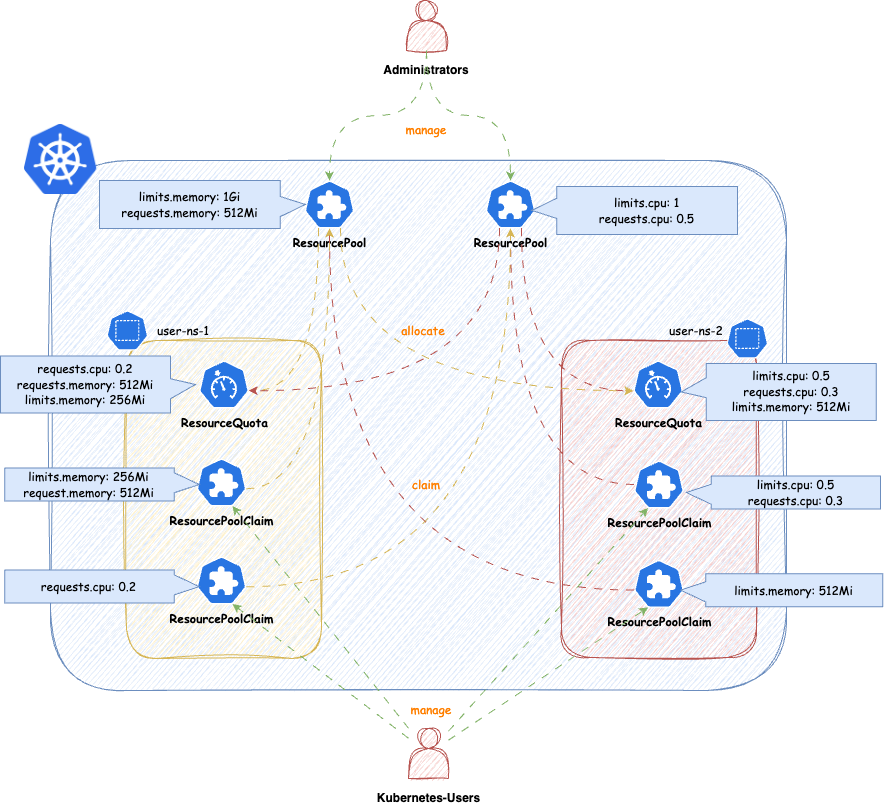
`ResourcePools` allow you to define a set of resources, similar to how `ResourceQuotas` work. `ResourcePools` are defined at the cluster scope and should be managed by cluster administrators. However, they provide an interface where cluster administrators can specify from which namespaces resources in a ResourcePool can be claimed. Claiming is done via a namespaced CRD called `ResourcePoolClaim`.
It is then up to the group of users within those namespaces to manage the resources they consume per namespace. Each ResourcePool provisions a ResourceQuota into all the selected namespaces. Essentially, when `ResourcePoolClaims` are assigned to a ResourcePool, they stack additional resources on top of that `ResourceQuota`, based on the namespace from which the `ResourcePoolClaim` was created.
You can create any number of `ResourcePools` for any kind of namespace; they do not need to be part of a Tenant. Note that the usual ResourceQuota mechanisms apply when, for example, the same resources are defined in multiple `ResourcePools` for the same namespaces (e.g., the lowest defined quota for a resource is always considered).
```yaml
apiVersion: capsule.clastix.io/v1beta2
kind: ResourcePool
metadata:
name: example
spec:
quota:
hard:
limits.cpu: "2"
limits.memory: 2Gi
requests.cpu: "2"
requests.memory: 2Gi
requests.storage: "5Gi"
selectors:
- matchLabels:
capsule.clastix.io/tenant: example
```
### Selection
The selection of namespaces is done via labels, you can define multiple independent LabelSelectors for a ResourcePool. This gives you a lot of flexibility if you want to span over different kind of namespaces (eg. all namespaces of multiple Tenants, System Namespaces, stages of Tenants etc.)
Here's an example of a simple Selector:
```yaml
---
apiVersion: capsule.clastix.io/v1beta2
kind: ResourcePool
metadata:
name: solar
spec:
quota:
hard:
limits.cpu: "2"
limits.memory: 2Gi
selectors:
- matchLabels:
capsule.clastix.io/tenant: solar
```
This will select all the namespaces, which are part of the Tenant `solar`. Each statement under `selectors` is treated independent, so for example this is how you can select multiple Tenant's namespaces:
```yaml
apiVersion: capsule.clastix.io/v1beta2
kind: ResourcePool
metadata:
name: green
spec:
quota:
hard:
limits.cpu: "2"
limits.memory: 2Gi
selectors:
- matchLabels:
capsule.clastix.io/tenant: solar
- matchLabels:
capsule.clastix.io/tenant: wind
```
### Quota
Nothing special here, just all the fields you know from [ResourceQuotas](https://kubernetes.io/docs/concepts/policy/resource-quotas/). The amount defined in `quota.hard` represents the total resources which can be claimed from the [selected namespaces](#selection). Through claims the ResourceQuota is then increased or decreased. Note the following:
- You can't decrease the `.spec.quota.hard` if the current allocation from claims is greater than the new decreased number. You must first [release](#release) claims, to free up that space.
- You can decrease or remove resources, if they are unused (`0`)
Other than that, you can use all the fields from [ResourceQuotas](https://kubernetes.io/docs/concepts/policy/resource-quotas/)
```yaml
---
apiVersion: capsule.clastix.io/v1beta2
kind: ResourcePool
metadata:
name: best-effort-pool
spec:
selectors:
- matchExpressions:
- { key: capsule.clastix.io/tenant, operator: Exists }
quota:
hard:
cpu: "1000"
memory: "200Gi"
pods: "10"
scopeSelector:
matchExpressions:
- operator: In
scopeName: PriorityClass
values:
- "best-effort"
```
Each `ResourcePool` is representative for one `ResourceQuota`. In contrast to the old implementation, where multiple `ResourceQuotas` could have been defined in a slice. So if you eg. want to use different `scopeSelectors` or similar, you should create a new `ResourcePool` for each.
```yaml
---
apiVersion: capsule.clastix.io/v1beta2
kind: ResourcePool
metadata:
name: gold-storage
spec:
selectors:
- matchExpressions:
- { key: company.com/env, operator: In, values: [prod, pre-prod] }
quota:
hard:
requests.storage: "10Gi"
persistentvolumeclaims: "10"
scopeSelector:
matchExpressions:
- operator: In
scopeName: VolumeAttributesClass
values: ["gold"]
```
### Defaults
Defaults can contain resources, which are not mentioned in the [Quota](#quota) of a `ResourcePool`. This is mainly to allow you, to block resources for example:
```yaml
---
apiVersion: capsule.clastix.io/v1beta2
kind: ResourcePool
metadata:
name: example
spec:
defaults:
requests.storage: "0Gi"
quota:
hard:
limits.cpu: "2"
limits.memory: 2Gi
requests.cpu: "2"
requests.memory: 2Gi
requests.storage: "5Gi"
selectors:
- matchLabels:
capsule.clastix.io/tenant: example
```
This results in a `ResourceQuota` from this pool in all [selected](#selection), which blocks the allocation of `requests.storage`:
```shell
NAME AGE REQUEST LIMIT
capsule-pool-example 3s requests.storage: 0/0
```
If no Defaults are defined, the `ResourceQuota` for the `ResourcePool` is still provisioned but it's `.spec.hard` is empty.
```yaml
---
apiVersion: capsule.clastix.io/v1beta2
kind: ResourcePool
metadata:
name: example
spec:
quota:
hard:
limits.cpu: "2"
limits.memory: 2Gi
requests.cpu: "2"
requests.memory: 2Gi
requests.storage: "5Gi"
selectors:
- matchLabels:
capsule.clastix.io/tenant: example
```
This allows users to essentially schedule anything in the namespace:
```shell
NAME AGE REQUEST LIMIT
capsule-pool-exmaple 2m47s
```
To prevent this, you might consider using the [DefaultsZero option](#defaultszero). This option can also be combined with setting other defaults, not part of the `.spec.quota.hard`. Here we are additionally restricting the creation of `persistentvolumeclaims`:
```yaml
apiVersion: capsule.clastix.io/v1beta2
kind: ResourcePool
metadata:
name: example
spec:
defaults:
"count/persistentvolumeclaims": 3
config:
defaultsZero: true
quota:
hard:
limits.cpu: "2"
limits.memory: 2Gi
requests.cpu: "2"
requests.memory: 2Gi
requests.storage: "5Gi"
selectors:
- matchLabels:
capsule.clastix.io/tenant: example
```
Results in:
```shell
NAME AGE REQUEST LIMIT
capsule-pool-example 10h count/persistentvolumeclaims: 0/3, requests.cpu: 0/0, requests.memory: 0/0, requests.storage: 0/0 limits.cpu: 0/0, limits.memory: 0/0
```
### Options
Options that can be defined on a per-`ResourcePool` basis and influence the general behavior of the `ResourcePool`.
#### OrderedQueue
When `ResourcePoolClaims` are allocated to a pool, they are placed in a queue. The pool attempts to allocate claims in the order of their [creation timestamps](#priority). However, even if a claim was created earlier, if it requests more resources than are currently available, it will remain in the queue. Meanwhile, a lower-priority claim that fits within the available resources may still be allocated, despite its lower priority.
Enabling this option enforces strict ordering: claims cannot be skipped, even if they block other claims from being fulfilled due to resource exhaustion. The `CreationTimestamp` is strictly respected, meaning that once a claim is queued, no subsequent claim can bypass it, even if it requires fewer resources.
**Default**: `false`
#### DefaultsZero
Sets the [default values](#defaults) for the `ResourceQuota` created for the `ResourcePool`. When enabled, all resources in the quota are initialized to zero. This is useful in scenarios where users should not be able to consume any resources without explicitly creating claims. In such cases, it makes sense to initialize all available resources in the `ResourcePool` to `0`.
**Default**: `false`
#### DeleteBoundResources
By default, when a `ResourcePool` is deleted, any `ResourcePoolClaims` bound to it are only disassociated, not deleted. Enabling this option ensures that all `ResourcePoolClaims` in a bound state are deleted when the corresponding `ResourcePool` is deleted.
**Default**: `false`
### LimitRanges
When defining `ResourcePools` you might want to consider distributing [LimitRanges](https://kubernetes.io/docs/concepts/policy/limit-range/) via [Tenant Replications](/docs/replications):
```yaml
apiVersion: capsule.clastix.io/v1beta2
kind: TenantResource
metadata:
name: example
namespace: solar-system
spec:
resyncPeriod: 60s
resources:
- namespaceSelector:
matchLabels:
capsule.clastix.io/tenant: example
rawItems:
- apiVersion: v1
kind: LimitRange
metadata:
name: cpu-resource-constraint
spec:
limits:
- default: # this section defines default limits
cpu: 500m
defaultRequest: # this section defines default requests
cpu: 500m
max: # max and min define the limit range
cpu: "1"
min:
cpu: 100m
type: Container
```
## ResourcePoolClaims
`ResourcePoolClaims` declared claims of resources from a single `ResourcePool`. When a `ResourcePoolClaim` is successfully bound to a `ResourcePool`, it's requested resources are stacked to the `ResourceQuota` from the `ResourcePool` in the corresponding namespaces, where the `ResourcePoolClaim` was declared. So the declaration of a `ResourcePoolClaim` is very simple:
```yaml
apiVersion: capsule.clastix.io/v1beta2
kind: ResourcePoolClaim
metadata:
name: get-me-cpu
namespace: solar-test
spec:
pool: "sample"
claim:
requests.cpu: "2"
requests.memory: 2Gi
```
`ResourcePoolClaims` are decoupled from the lifecycle of `ResourcePools`. If a `ResourcePool` is deleted where a `ResourcePoolClaim` was bound to, the `ResourcePoolClaim` becomes unassigned, but is not deleted.
### Allocation
The Connection between `ResourcePools` and `ResourcePoolClaims` is done via the `.spec.pool` field. With that field you must be very specific, from which `ResourcePool` a `ResourcePoolClaim` claims resources. On the counter-part, the `ResourcePool`, the namespace from the `ResourcePoolClaim` must be allowed to claim resources from the `ResourcePool`.
If you are trying to allocate a Pool which does not exist or is not allowed to be claimed from, from the namespace the `ResourcePoolClaim` was made, you will get a failed `Assigned` status:
```shell
solar-test get-me-cpu Assigned Failed ResourcePool.capsule.clastix.io "sample" not found 12s
```
Similar errors may occur if you are trying to claim resources from a pool, where the given resources are not claimable.
#### Auto-Assignment
If no `.spec.pool` was delivered a Webhook will try to evaluate a matching `ResourcePool` for the `ResourcePoolClaim`. In that process of evaluation the following criteria are considered:
* A `ResourcePool` has all the resources in their definition available the `ResourcePoolClaim` is trying to claim.
If no Pool can be auto-assigned, the `ResourcePoolClaim` will enter an `Unassigned` state. Where it remains until `ResourcePools` considering the namespaces the `ResourcePoolClaim` is deployed in have more resources or a new `ResourcePool` is defined manually.
The Auto-Assignment Process is only executed, when `.spec.pool` is unset on `Create` or `Update` operations.
#### Bound
A `ResourcePoolClaim` is considered `Bound`, when the requested resources from the claim were successfully allocated from the `ResourcePool`. And the resources are actually used by any `ResourceQuota` in the namespace the claim was created in. If the resources are not used yet, the `ResourcePoolClaims` is considered `Unused` and can be deleted, change to a different `ResourcePool` or released without any further actions. However when it's resources are used, the claim is `Bound` and can not be modified or deleted until the resources are released (not longer in use).
The selection of which `ResourcePoolClaim` is `Bound` is based on a greedy pattern. Meaning we sort the `ResourcePoolClaims` by their `CreationTimestamp` and try to allocate them one by one until no more resources are available from the `ResourcePool`.
Let's see this in action. We can see that both claims are unused and can be released.
```shell
kubectl get resourcepoolclaim -n solar-test
NAME POOL READY MESSAGE BOUND REASON AGE
get-me-solar solar-pool True reconciled False claim is unused 9h
get-me-solar-2 solar-pool True reconciled False claim is unused 9h
kubectl get resourcequota -n solar-test
NAME REQUEST LIMIT AGE
capsule-pool-solar-pool requests.cpu: 4/4, requests.memory: 4Gi/4Gi 7m53s
```
We now create a pod to consume the amount of resources provided by the claim `get-me-solar` (`cpu: 2` and `memory: 2Gi`). We can see that half of the claim is now used:
```shell
kubectl get resourcepoolclaim -n solar-test
NAME POOL READY MESSAGE BOUND REASON AGE
get-me-solar solar-pool True reconciled True claim is used 12m
get-me-solar-2 solar-pool True reconciled False claim is unused 12m
kubectl get resourcequota -n solar-test
NAME REQUEST LIMIT AGE
capsule-pool-solar-pool requests.cpu: 2/4, requests.memory: 2Gi/4Gi 11m
```
We can remove `get-me-solar-2`, as it's still unused:
```shell
kubectl delete resourcepoolclaim -n solar-test get-me-solar-2
resourcepoolclaim.capsule.clastix.io "get-me-solar-2" deleted
```
However interactions with `get-me-solar` are now limited, as it's `Bound`:
```shell
kubectl delete resourcepoolclaim -n solar-test get-me-solar
Error from server (Forbidden): admission webhook "resourcepoolclaims.projectcapsule.dev" denied the request: cannot delete the pool while claim is used in resourcepool solar-pool
```
If we remove the pod again, the `ResourcePoolClaim` becomes unused again and can be deleted or modified.
```shell
kubectl get resourcepoolclaim -n solar-test
NAME POOL READY MESSAGE BOUND REASON AGE
get-me-solar solar-pool True reconciled False claim is unused 16m
kubectl get resourcequota -n solar-test
NAME REQUEST LIMIT AGE
capsule-pool-solar-pool requests.cpu: 0/2, requests.memory: 0/2Gi 17m
```
#### Release
If a `ResourcePoolClaim` is deleted, the resources are released back to the `ResourcePool`. This means that the resources are no longer reserved for the claim and can be used by other claims.
- By deleting the `ResourcePoolClaim` object (**Recommended**).
- By annotating the `ResourcePoolClaim` with `projectcapsule.dev/release: "true"`. This will release the `ResourcePoolClaim` from the `ResourcePool` without deleting the object itself and instantly requeue.
Both these actions can only be performed if the `ResourcePoolClaim` is in a [`Bound`](#bound) state `False` (not used currently). Otherwise your first have to free the resources used by the claim in order to release it. You can verify the `Bound` state for all `ResourcePoolClaims` in a namespace with.
#### Immutable
Once a `ResourcePoolClaim` has successfully claimed resources from a `ResourcePool`, the claim is immutable. This means that the claim cannot be modified or deleted until the resources have been released back to the `ResourcePool`. This means `ResourcePoolClaim` can not be expanded or shrunk, without [releasing](#release).
### Queue
`ResourcePoolClaims` can always be created, even if the targeted `ResourcePool` does not have enough resources available at the time. In that case `ResourcePoolClaims` are put into a `Queue`-State, where they wait until they can claim the resources they are after. They following describes the different exhaustion indicators and what they mean, in case a `ResourcePoolClaim` gets scheduled.
When a `ResourcePoolClaims` is in `Queued`-State it is still mutable. So Resources and Pool-Assignment can still be changed.
#### Exhaustions
There are different types of exhaustions which may occur when attempting to allocate a claim. They Status of each claim indicates
##### PoolExhausted
The requested resources are not available on the `ResourcePool`. Until other resources release resources or the pool size is increased the `ResourcePoolClaim` is queued. In this example the `ResourcePoolClaim` is trying to claim `requests.memory=2Gi`. However only `requests.memory=1Gi` are still available to be claimed from the `ResourcePool`
```shell
NAMESPACE NAME POOL STATUS REASON MESSAGE AGE
solar-test get-mem sampler Bound QueueExhausted requested: requests.memory=2Gi, queued: requests.memory=1Gi 9m19s
```
In this case you have the following options:
1. Request less resources for claiming - `requests.memory=1Gi`
2. Wait until resources become from the `ResourcePool`. When `1Gi` of `requests.memory` gets released, the `ResourcePoolClaim` will be able to bind `requests.memory=2Gi`.
3. Release another `ResourcePoolClaim` which might free up `requests.memory`
However, claims which are requesting less than the `ResourcePoolClaim` `solar-test`, will be able to allocate their resources. Let's say we have this second `ResourcePoolClaim`:
```yaml
---
apiVersion: capsule.clastix.io/v1beta2
kind: ResourcePoolClaim
metadata:
name: skip-the-line
namespace: solar-test
spec:
pool: "sampler"
claim:
requests.memory: 512Mi
```
Applying this `ResourcePoolClaim` leads to it being able to bind these resources. This behavior can be controlled with [orderedQueue](#orderedqueue).
```shell
NAMESPACE NAME POOL STATUS REASON MESSAGE AGE
solar-test get-me-cpu sampler Bound PoolExhausted requested: requests.memory=2Gi, available: requests.memory=512Mi 16m
solar-test skip-the-line sampler Bound Succeeded Claimed resources 2s
```
If [orderedQueue](#orderedqueue) is enabled, only the first item that exhausted a resource from the `ResourcePool` get the `PoolExhausted` state. Following claims fro the same resources get [QueueExhausted](#queueexhausted).
##### QueueExhausted
A `ResourcePoolClaim` with [higher priority](#priority) is trying to allocate these resources, but is exhausting the `ResourcePool`. The `ResourcePool` has [orderedQueue](#orderedqueue) enabled, meaning that the `ResourcePoolClaim` with the [highest priority](#priority) must first schedule it's resources, before any other `ResourcePoolClaim` can claim further resources. This queue is resource based (eg. `requests.memory`), `ResourcePoolClaim` with [lower priority](#priority) may still be `Bound`, if they are not trying to allocate resources which are being exhausted by another `ResourcePoolClaim` with [highest priority](#priority).
```shell
NAMESPACE NAME POOL STATUS REASON MESSAGE AGE
solar-test get-mem sampler Bound QueueExhausted requested: requests.memory=2Gi, queued: requests.memory=1Gi 9m19s
```
The above means, that as `ResourcePoolClaim` with [higher priority](#priority) is trying to allocate `requests.memory=1Gi` but that already leads to an `PoolExhausted` for that `ResourcePoolClaim`.
### Priority
The Priority of how the claims are processed, is deterministic defined based on the following order of attributes from each claim:
* `CreationTimestamp` - Oldest first
* `Name` - **Tiebreaker**
* `Namespace` - **Tiebreaker**
**Tiebreaker**: If two claims have the same `CreationTimestamp`, they are then sorted alphabetically by their `Name`. If two claims have the same `CreationTimestamp` and `Name`, they are then sorted alphabetically by their `Namespace`. This means that if two claims are created at the same time, and have the same name, the claim with the lexicographically smaller `Name` will be processed first. If two claims have the same `CreationTimestamp`, `Name`, and `Namespace`, then the namespace is tiebreaking. This may be relevant in GitOps setups.
## Operating
### Monitoring
Dashboards can be deployed via helm-chart, enable the following values:
```yaml
monitoring:
dashboards:
enabled: true
```
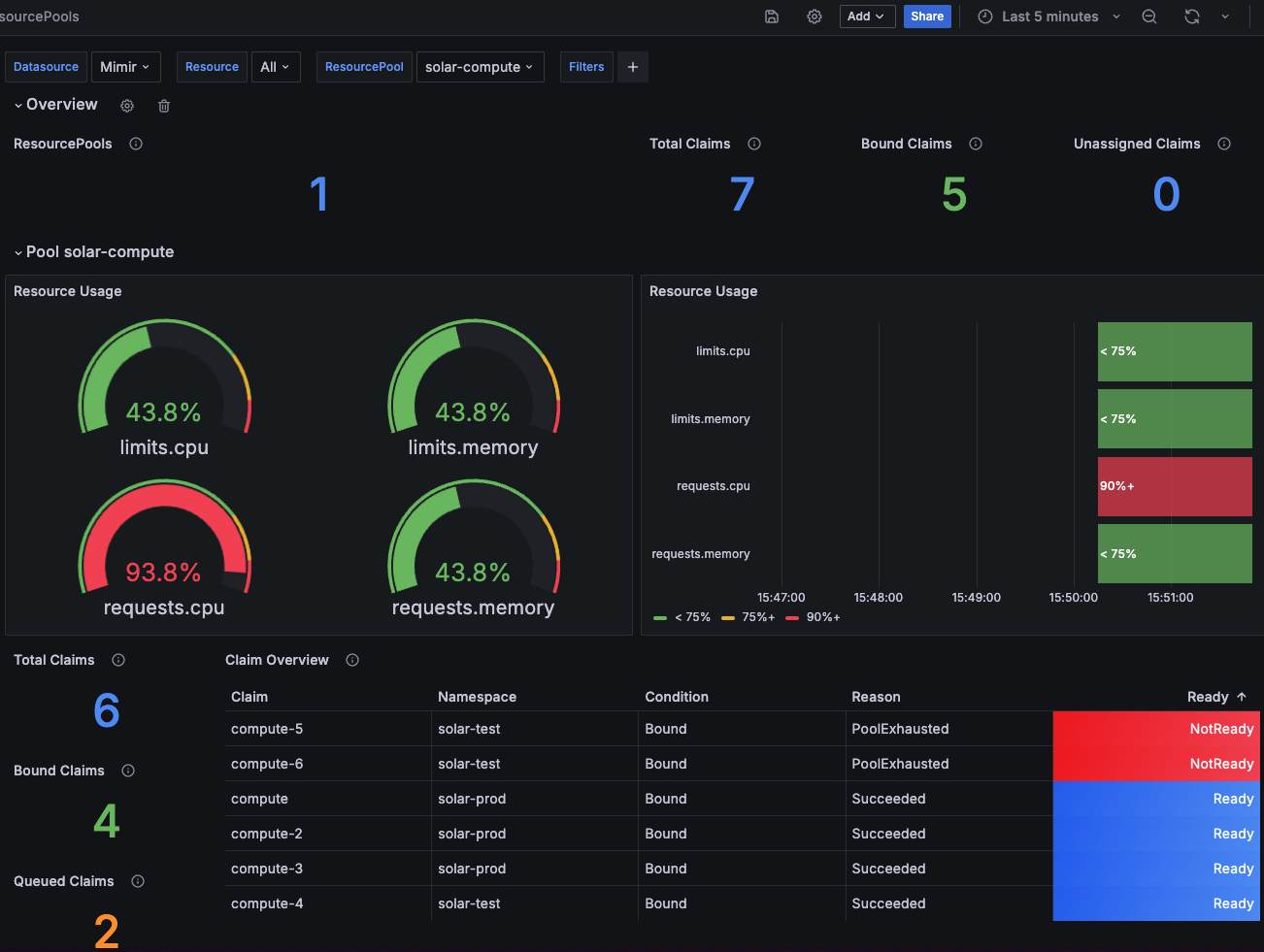
Dashboard which grants a detailed overview over the ResourcePools
#### Rules
Example rules to give you some idea, what's possible.
1. Alert on [ResourcePools](../resourcepools/) usage
```yaml
apiVersion: monitoring.coreos.com/v1
kind: PrometheusRule
metadata:
name: capsule-resourcepools-alerts
spec:
groups:
- name: capsule-resourcepools.rules
rules:
- alert: CapsuleResourcePoolHighUsageWarning
expr: |
capsule_pool_usage_percentage > 90
for: 10m
labels:
severity: warning
annotations:
summary: High resource usage in Resourcepool
description: |
Resource {{ $labels.resource }} in pool {{ $labels.pool }} is at {{ $value }}% usage for the last 10 minutes.
- alert: CapsuleResourcePoolHighUsageCritical
expr: |
capsule_pool_usage_percentage > 95
for: 10m
labels:
severity: critical
annotations:
summary: Critical resource usage in Resourcepool
description: |
Resource {{ $labels.resource }} in pool {{ $labels.pool }} has exceeded 95% usage for the last 10 minutes.
- alert: CapsuleResourcePoolExhausted
expr: |
capsule_pool_condition{condition="Exhausted"} == 1
for: 60m
labels:
severity: critical
annotations:
summary: Resource pool exhausted
description: |
Pool {{ $labels.pool }} has been Exhausted for more than 60 minutes.
- alert: CapsuleResourcePoolNotReady
expr: |
capsule_pool_condition{condition="Ready"} == 0
for: 10m
labels:
severity: warning
annotations:
summary: Resource pool not ready
description: |
Pool {{ $labels.pool }} has not been Ready for more than 10 minutes.
- name: capsule-resourcepoolclaims.rules
rules:
- alert: CapsuleResourcePoolClaimExhausted
expr: |
capsule_claim_condition{condition="Exhausted"} == 1
for: 24h
labels:
severity: critical
annotations:
summary: ResourcePoolClaim exhausted
description: |
ResourcePoolClaim {{ $labels.name }}/{{ $labels.target_namespace }} has been Exhausted for more than 24 hours.
- alert: CapsuleResourcePoolClaimNotReady
expr: |
capsule_claim_condition{condition="Ready"} == 0
for: 60m
labels:
severity: warning
annotations:
summary: ResourcePoolClaim not ready
description: |
ResourcePoolClaim {{ $labels.name }}/{{ $labels.target_namespace }} has not been Ready for more than 60 minutes.
```
#### Metrics
The following Metrics are exposed and can be used for monitoring:
```shell
# HELP capsule_claim_condition The current condition status of a claim.
# TYPE capsule_claim_condition gauge
capsule_claim_condition{condition="Bound",name="get-me-customer",target_namespace="solar-test"} 1
capsule_claim_condition{condition="Bound",name="get-me-solar",target_namespace="solar-test"} 1
capsule_claim_condition{condition="Bound",name="get-me-solar-2",target_namespace="solar-test"} 0
capsule_claim_condition{condition="Exhausted",name="get-me-customer",target_namespace="solar-test"} 0
capsule_claim_condition{condition="Exhausted",name="get-me-solar",target_namespace="solar-test"} 0
capsule_claim_condition{condition="Exhausted",name="get-me-solar-2",target_namespace="solar-test"} 1
capsule_claim_condition{condition="Ready",name="get-me-customer",target_namespace="solar-test"} 1
capsule_claim_condition{condition="Ready",name="get-me-solar",target_namespace="solar-test"} 1
capsule_claim_condition{condition="Ready",name="get-me-solar-2",target_namespace="solar-test"} 1
# HELP capsule_claim_pool The current assigned pool of a claim.
# TYPE capsule_claim_pool gauge
capsule_claim_pool{name="get-me-solar",pool="solar-compute",target_namespace="solar-test"} 1
capsule_claim_pool{name="get-me-solar-2",pool="solar-compute",target_namespace="solar-test"} 1
# HELP capsule_claim_resource The given amount of resources from the claim
# TYPE capsule_claim_resource gauge
capsule_claim_resource{name="compute",resource="limits.cpu",target_namespace="solar-prod"} 0.375
capsule_claim_resource{name="compute",resource="limits.memory",target_namespace="solar-prod"} 4.02653184e+08
capsule_claim_resource{name="compute",resource="requests.cpu",target_namespace="solar-prod"} 0.375
capsule_claim_resource{name="compute",resource="requests.memory",target_namespace="solar-prod"} 4.02653184e+08
capsule_claim_resource{name="compute-10",resource="limits.memory",target_namespace="solar-prod"} 1.073741824e+10
capsule_claim_resource{name="compute-2",resource="limits.cpu",target_namespace="solar-prod"} 0.5
capsule_claim_resource{name="compute-2",resource="limits.memory",target_namespace="solar-prod"} 5.36870912e+08
capsule_claim_resource{name="compute-2",resource="requests.cpu",target_namespace="solar-prod"} 0.5
capsule_claim_resource{name="compute-2",resource="requests.memory",target_namespace="solar-prod"} 5.36870912e+08
capsule_claim_resource{name="compute-3",resource="requests.cpu",target_namespace="solar-prod"} 0.5
capsule_claim_resource{name="compute-4",resource="requests.cpu",target_namespace="solar-test"} 0.5
capsule_claim_resource{name="compute-5",resource="requests.cpu",target_namespace="solar-test"} 0.5
capsule_claim_resource{name="compute-6",resource="requests.cpu",target_namespace="solar-test"} 5
capsule_claim_resource{name="pods",resource="pods",target_namespace="solar-test"} 3
# HELP capsule_pool_available Current resource availability for a given resource in a resource pool
# TYPE capsule_pool_available gauge
capsule_pool_available{pool="solar-compute",resource="limits.cpu"} 1.125
capsule_pool_available{pool="solar-compute",resource="limits.memory"} 1.207959552e+09
capsule_pool_available{pool="solar-compute",resource="requests.cpu"} 0.125
capsule_pool_available{pool="solar-compute",resource="requests.memory"} 1.207959552e+09
capsule_pool_available{pool="solar-size",resource="pods"} 4
# HELP capsule_pool_condition Current conditions for a given resource in a resource pool
# TYPE capsule_pool_condition gauge
capsule_pool_condition{condition="Exhausted",pool="solar-size"} 0
capsule_pool_condition{condition="Exhausted",pool="solar-compute"} 1
capsule_pool_condition{condition="Ready",pool="solar-size"} 1
capsule_pool_condition{condition="Ready",pool="solar-compute"} 1
# HELP capsule_pool_exhaustion Resources become exhausted, when there's not enough available for all claims and the claims get queued
# TYPE capsule_pool_exhaustion gauge
capsule_pool_exhaustion{pool="solar-compute",resource="limits.memory"} 1.073741824e+10
capsule_pool_exhaustion{pool="solar-compute",resource="requests.cpu"} 5.5
# HELP capsule_pool_exhaustion_percentage Resources become exhausted, when there's not enough available for all claims and the claims get queued (Percentage)
# TYPE capsule_pool_exhaustion_percentage gauge
capsule_pool_exhaustion_percentage{pool="solar-compute",resource="limits.memory"} 788.8888888888889
capsule_pool_exhaustion_percentage{pool="solar-compute",resource="requests.cpu"} 4300
# HELP capsule_pool_limit Current resource limit for a given resource in a resource pool
# TYPE capsule_pool_limit gauge
capsule_pool_limit{pool="solar-compute",resource="limits.cpu"} 2
capsule_pool_limit{pool="solar-compute",resource="limits.memory"} 2.147483648e+09
capsule_pool_limit{pool="solar-compute",resource="requests.cpu"} 2
capsule_pool_limit{pool="solar-compute",resource="requests.memory"} 2.147483648e+09
capsule_pool_limit{pool="solar-size",resource="pods"} 7
# HELP capsule_pool_namespace_usage Current resources claimed on namespace basis for a given resource in a resource pool for a specific namespace
# TYPE capsule_pool_namespace_usage gauge
capsule_pool_namespace_usage{pool="solar-compute",resource="limits.cpu",target_namespace="solar-prod"} 0.875
capsule_pool_namespace_usage{pool="solar-compute",resource="limits.memory",target_namespace="solar-prod"} 9.39524096e+08
capsule_pool_namespace_usage{pool="solar-compute",resource="requests.cpu",target_namespace="solar-prod"} 1.375
capsule_pool_namespace_usage{pool="solar-compute",resource="requests.cpu",target_namespace="solar-test"} 0.5
capsule_pool_namespace_usage{pool="solar-compute",resource="requests.memory",target_namespace="solar-prod"} 9.39524096e+08
capsule_pool_namespace_usage{pool="solar-size",resource="pods",target_namespace="solar-test"} 3
# HELP capsule_pool_namespace_usage_percentage Current resources claimed on namespace basis for a given resource in a resource pool for a specific namespace (percentage)
# TYPE capsule_pool_namespace_usage_percentage gauge
capsule_pool_namespace_usage_percentage{pool="solar-compute",resource="limits.cpu",target_namespace="solar-prod"} 43.75
capsule_pool_namespace_usage_percentage{pool="solar-compute",resource="limits.memory",target_namespace="solar-prod"} 43.75
capsule_pool_namespace_usage_percentage{pool="solar-compute",resource="requests.cpu",target_namespace="solar-prod"} 68.75
capsule_pool_namespace_usage_percentage{pool="solar-compute",resource="requests.cpu",target_namespace="solar-test"} 25
capsule_pool_namespace_usage_percentage{pool="solar-compute",resource="requests.memory",target_namespace="solar-prod"} 43.75
capsule_pool_namespace_usage_percentage{pool="solar-size",resource="pods",target_namespace="solar-test"} 42.857142857142854
# HELP capsule_pool_resource Type of resource being used in a resource pool
# TYPE capsule_pool_resource gauge
capsule_pool_resource{pool="solar-compute",resource="limits.cpu"} 1
capsule_pool_resource{pool="solar-compute",resource="limits.memory"} 1
capsule_pool_resource{pool="solar-compute",resource="requests.cpu"} 1
capsule_pool_resource{pool="solar-compute",resource="requests.memory"} 1
capsule_pool_resource{pool="solar-size",resource="pods"} 1
# HELP capsule_pool_usage Current resource usage for a given resource in a resource pool
# TYPE capsule_pool_usage gauge
capsule_pool_usage{pool="solar-compute",resource="limits.cpu"} 0.875
capsule_pool_usage{pool="solar-compute",resource="limits.memory"} 9.39524096e+08
capsule_pool_usage{pool="solar-compute",resource="requests.cpu"} 1.875
capsule_pool_usage{pool="solar-compute",resource="requests.memory"} 9.39524096e+08
capsule_pool_usage{pool="solar-size",resource="pods"} 3
# HELP capsule_pool_usage_percentage Current resource usage for a given resource in a resource pool (percentage)
# TYPE capsule_pool_usage_percentage gauge
capsule_pool_usage_percentage{pool="solar-compute",resource="limits.cpu"} 43.75
capsule_pool_usage_percentage{pool="solar-compute",resource="limits.memory"} 43.75
capsule_pool_usage_percentage{pool="solar-compute",resource="requests.cpu"} 93.75
capsule_pool_usage_percentage{pool="solar-compute",resource="requests.memory"} 43.75
capsule_pool_usage_percentage{pool="solar-size",resource="pods"} 42.857142857142854
```
### Migration
>
>
> We highly recommend to reassess how you are allocating resources to your tenants and if you want to change the scope of the ResourcePools to be more granular or wider.
To Migrate from the old `ResourceQuota` to `ResourcePools`, you can follow the steps below. This guide assumes you want to port the old `ResourceQuota` to the new `ResourcePools` in exactly the same capacity and scope.
The steps shown are an example to migrate a single Tenants ResourceQuota to a ResourcePool.
#### 1. Overview
We are working with the following tenant. Asses the Situation of `resourceQuotas`. This guide is mainly relevant if the `scope` is `Tenant`:
```yaml
apiVersion: capsule.clastix.io/v1beta2
kind: Tenant
metadata:
labels:
kubernetes.io/metadata.name: migration
name: migration
spec:
owners:
- clusterRoles:
- admin
- capsule-namespace-deleter
kind: User
name: bob
preventDeletion: false
resourceQuotas:
items:
- hard:
limits.cpu: "2"
limits.memory: 2Gi
requests.cpu: "2"
requests.memory: 2Gi
- hard:
pods: "7"
scope: Tenant
status:
namespaces:
- migration-dev
- migration-prod
- migration-test
size: 3
state: Active
```
#### 2. Abstracting to ResourcePools
> **Warning**
>
> Do not apply the resourcepools yet, this may lead to workloads not being able to schedule!
We are now abstracting. For each item, we are creating a `ResourcePool` with the same values. The `ResourcePool` will be scoped to the `Tenant` and will be used for all namespaces in the tenant. Let's first migrate the first item:
```yaml
---
apiVersion: capsule.clastix.io/v1beta2
kind: ResourcePool
metadata:
name: migration-compute
spec:
config:
defaultsZero: true
selectors:
- matchLabels:
capsule.clastix.io/tenant: migration
quota:
hard:
limits.cpu: "2"
limits.memory: 2Gi
requests.cpu: "2"
requests.memory: 2Gi
```
The naming etc. is up to you. Important, we again select all namespaces from the `migration` tenant with the selector `capsule.clastix.io/tenant: migration`. The defined `config` is what we deem to be most compatible with the old `ResourceQuota` behavior. You may change these according to your requirements.
The same process can be repeated for the second item (or each of your items). The `ResourcePool` will be scoped to the `Tenant` and will be used for all namespaces in the tenant. Let's migrate the second item:
```yaml
---
apiVersion: capsule.clastix.io/v1beta2
kind: ResourcePool
metadata:
name: migration-size
spec:
config:
defaultsZero: true
selectors:
- matchLabels:
capsule.clastix.io/tenant: migration
quota:
hard:
pods: "7"
```
#### 3. Create ResourcePoolClaims
Now we need to create the `ResourcePoolClaims` for the `ResourcePools`. The `ResourcePoolClaims` are used to claim resources from the `ResourcePools` to the respective namespaces. Let's start with the namespace `migration-dev`:
```yaml
kubectl get resourcequota -n migration-dev
NAME AGE REQUEST LIMIT
capsule-migration-0 5m21s requests.cpu: 375m/1500m, requests.memory: 384Mi/1536Mi limits.cpu: 375m/1500m, limits.memory: 384Mi/1536Mi
capsule-migration-1 5m21s pods: 3/3
```
Our goal is now to port the current usage into `ResourcePoolClaims`. **Here you must make sure, that you might need to allocate more resources to your claims, than currently is needed (eg. to allow RollingUpdates etc.).**. For the example we are porting the current usage over 1:1 to `ResourcePoolClaims`
We created the `ResourcePool` named `migration-compute`, where we are going to claim the resources from (for `capsule-migration-0`). This results in the following `ResourcePoolClaim`:
```yaml
---
apiVersion: capsule.clastix.io/v1beta2
kind: ResourcePoolClaim
metadata:
name: compute
namespace: migration-dev
spec:
pool: "migration-compute"
claim:
requests.cpu: 375m
requests.memory: 384Mi
limits.cpu: 375m
limits.memory: 384Mi
```
The same can be done for the `capsule-migration-1` `ResourceQuota`.
```yaml
---
apiVersion: capsule.clastix.io/v1beta2
kind: ResourcePoolClaim
metadata:
name: pods
namespace: migration-dev
spec:
pool: "migration-size"
claim:
pods: "3"
```
You can create the claims, they will remain in failed state until we apply the `ResourcePools`:
```shell
kubectl get resourcepoolclaims -n migration-dev
NAME POOL STATUS REASON MESSAGE AGE
compute Assigned Failed ResourcePool.capsule.clastix.io "migration-compute" not found 2s
pods Assigned Failed ResourcePool.capsule.clastix.io "migration-size" not found 2s
```
#### 4. Applying and Verifying the ResourcePools
You may now apply [the `ResourcePools` prepared in step 2](#2-abstracting-to-resourcepools):
```shell
kubectl apply -f pools.yaml
resourcepool.capsule.clastix.io/migration-compute created
resourcepool.capsule.clastix.io/migration-size created
```
After applying, you should instantly see, that the `ResourcePoolClaims` in the `migration-dev` namespace could be `Bound` to the corresponding `ResourcePools`:
```shell
kubectl get resourcepoolclaims -n migration-dev
NAME POOL STATUS REASON MESSAGE AGE
compute migration-compute Bound Succeeded Claimed resources 4m9s
pods migration-size Bound Succeeded Claimed resources 4m9s
```
Now you can verify the new `ResourceQuotas` in the `migration-dev` namespace:
```shell
kubectl get resourcequota -n migration-dev
NAME AGE REQUEST LIMIT
capsule-migration-0 23m requests.cpu: 375m/1500m, requests.memory: 384Mi/1536Mi limits.cpu: 375m/1500m, limits.memory: 384Mi/1536Mi
capsule-migration-1 23m pods: 3/3
capsule-pool-migration-compute 110s requests.cpu: 375m/375m, requests.memory: 384Mi/384Mi limits.cpu: 375m/375m, limits.memory: 384Mi/384Mi
capsule-pool-migration-size 110s pods: 3/3
```
That looks already super promising. Now You need to repeat these steps for `migration-prod` and `migration-test`. (Script Contributions are welcome).
#### 5. Removing old ResourceQuotas
Once we have migrated all resources over the `ResourcePoolClaims`, we can remove the `ResourceQuota` system. First of all, we are removing the `.spec.resourceQuotas` entirely. Currently it will again add the `.spec.resourceQuotas.scope` field, important is, that no more `.spec.resourceQuotas.items` exist:
```yaml
apiVersion: capsule.clastix.io/v1beta2
kind: Tenant
metadata:
labels:
kubernetes.io/metadata.name: migration
name: migration
spec:
owners:
- clusterRoles:
- admin
- capsule-namespace-deleter
kind: User
name: bob
resourceQuotas: {}
```
This will remove all `ResourceQuotas` from namespace, verify like:
```shell
kubectl get resourcepoolclaims -n migration-dev
capsule-pool-migration-compute 130m requests.cpu: 375m/375m, requests.memory: 384Mi/384Mi limits.cpu: 375m/375m, limits.memory: 384Mi/384Mi
capsule-pool-migration-size 130m pods: 3/3
```
Success 🍀
## Why this is our answer
This part should provide you with a little bit of back story, as to why this implementation was done the way it currently is. Let's start.
Since the beginning of capsule we are struggling with a concurrency problem regarding `ResourcesQuotas`, this was already early detected in [Issue 49](https://github.com/projectcapsule/capsule/issues/49). Let's quickly recap what really the problem is with the current `ResourceQuota` centric approach.
With the current `ResourceQuota` with `Scope: Tenant` we encounter the problem, that resourcequotas spread across multiple namespaces referring to one tenant quota can be overprovisioned, if an operation is executed in parallel (eg. total is `services/count: 3`, in each namespace you could then create 3 services, leading to a possible overprovision of hard `* amount-namespaces`). The Problem in this approach is, that we are not doing anything with Webhooks, therefore we rely on the speed of the controller, where this entire construct becomes a matter of luck and racing conditions.
So, there needs to be change. But times have also changed and we have listened to our users, so the new approach to `ResourceQuotas` should:
* Not exclusively be scoped to one `Tenant`. Often scenarios include granting resources to multiple `Tenants` eg.
* When a application has multiple stages split into multiple stages
* An Application-Team owns multiple `Tenants`
* You want to share resources amongst applications of the same stage.
* Select based on namespaces, even if they are not part of the `Tenant` ecosystem. Often the requirement to control resources for operators, which make up your distribution, must also be guardlined across n-namespaces.
* Supplement new generation technology like [Kamaji](https://kamaji.clastix.io/), [vCluster](https://www.vcluster.com/) or [K3K](https://github.com/rancher/k3k). All these tool abstract Kubernetes into Pods. We also want to provide a solution which still proves capsule relevant in combination with such modern tools.
* Shifting Resource-Management to Tenant-Owners while Cluster-Administrators orchestrate a greater Pool of resources.
* **Consistency!!**
**Our initial Idea for a redesign was simple**: What if we just intercepted operations on the `resourcequota/status` subresource and calculate the offsets (or essentially what still can fit) on a Admission-Webhook. If another operation would have taken place the client operation would have thrown a conflict and rejected the admission, until it retries. Makes sense, right?
Here we have the problem, that even if we would block resourcequota status updates and wait until the actual quantity was added to the total, the resources have already been scheduled. The reason for that, is that the status for resourcequotas is **eventually** consistent, but what really matters at that moment is the hard spec (see this response from a maintainer [kubernetes/kubernetes#123434 (comment)](https://github.com/kubernetes/kubernetes/issues/123434#issuecomment-1964920277)). So essentially no matter the status, you can always provision as much resources, as the `.spec.hard` of a `ResourceQuota` indicates. This makes perfect sense, if your `ResourceQuota` is acting in a single namespace. However in our scenario, we have the same `ResourceQuota` in n-namespaces. So the overprovisioning problem still persists.
**Thinking of other ways**: So the next idea was essentially increasing the `ResourceQuota.spec.hard` based on the workloads which are added to a namespaces (essentially a reversed approach). The workflow for this would look like something like this:
* All resourcequotas get for their hard spec `0`
* New resource is requested (Evaluation what's needed at Admission)
* Controller gives the requested resources to the quota (by adding it to the total and updating the hard)
This way it's only possible to scheduled "ordered". In conclusion this would also downscale the resourcequota when the resources are no longer needed. This is how `ResourceQuotas` from the Kubernetes Core-API reject workload, when you try to allocate a Quantity in a namespaces, but the `ResourceQuota` does not have enough space.
But there are some problems with this approach as well:
* if you eg. schedule a pod and the quota is `count/0` there's no admission call on the resourcequota, which would be the easiest. So we would need to find a way to know, there's something new requesting resources. For example [Rancher](https://ranchermanager.docs.rancher.com/how-to-guides/new-user-guides/manage-clusters/projects-and-namespaces#4-optional-add-resource-quotas) works around this problem with namespaced `DefaultLimits`. But this is not the agile approach we would like to offer.
* The only indication that I know of is that we get an Event, which we can intercept with admission (`ResourceQuota Denied`), regarding quotaoverprovision.
If you eg update the resource quota that a pod now has space, it takes some time until that's registered and actually scheduled (just tested it for pods). I guess the timing depends on the kube-controller-manager flag `--concurrent-resource-quota-syncs` and/or `--resource-quota-sync-period
So it's really really difficult to increase quotas by the resources which are actually requested, especially the adding new resources process is where the performance would take a heavy hit.
Still thinking on this idea, the optimal solution would have been to calculate everything at admission and keep the `usage` vs `available` state on a global resources but not provisioning namespaced `ResourceQuotas`. This would have taken a bit pressure from the entire operation, as the resources would not have to be calculated twice (For our `GlobalResourceQuota` and the core `ResourceQuota`). In addition we should have added
So that's when we discarded everything and came up with the concept of `ResourcePools` and `ResourcePoolClaims`.
## Future Ideas
We want to keep this API as lightweight as possible. But we have already identified use-cases with customers, which make heavy use of ResourcePools:
- **JIT-Claiming**: Every Workload queues it's own claim when being submitted to admission. The respective claims are bound to the lifecycle of the provisioned resource.
- **Node-Population**: Populate the Quantity of a ResourcePool based on selected nodes.
---
Last modified August 21, 2026: feat: rewrite quickstart and refactor page ordering (#117) (#125) (040fb2a)